
there are rolling code IR transmitters also for some older car types, but you would need more information on the devices/specifications to look into emulating them.
found more information about this fob if it helps 
Key Features:
- Transmitter comes in standard 26 bit wiegand format.
- Each transmitter has its own unique code.
- All codes are factory programmed – cannot be compromised!
- 8′ to 50′ range.
- Individual transmitter codes can be easily added or deleted from any access control system.
- Infrared technology increases security by eliminating the phantom door openings associated with radio frequency systems.
- Confidential proprietary OEM wiegand bit formats available.
- Transmitters available in black color.
- Designed for indoor or outdoor use.
1 Like
That should be a good lead.
1 Like
also might help, seems to be possible
I would start with the flipper_toolbox → ir_plot.py
Save your file at ~/ir_fob.ir and do:
$ mkdir ~/git && cd ~/git
$ git clone https://github.com/evilpete/flipper_toolbox/
$ ./flipper_toolbox/ir_plot.py -f ~/ir_fob.ir
Unfortunately I don’t know what Button 1, 2, 3 and 4 are. Have you captured 4 times the same button with different length? Are there 4 buttons on the remote?
When I take a look at the plots, the second one seems to be happened.
But a look at the protocol from the last two answers can lead to the answer, as well.
I haven’t found what frequency is used by the Wiegand protocol/remote. a limitation of the Flipper is, the fixed frequency. It can’t read for example a Beolab 4000 remote (from Bang & Olufson), operating at a frequency of 4xx MHz.
2 Likes
Hey! Thanks for the detailed response. Ill run the commands once i get to my computer
Yes i captured the same button 4 times because each time gave a different number of samples im guessing because it has something to do with capturing RAW. When i tried on my fan remote it would show NEC and an address
1 Like
Yes, if the flipper knows the protocol, it will interpret the signal and save the address/command.
If the flipper dies not know the protocol, it will save the RAW signal. The RAW signal will be a bunch of numbers, that is representing the time between a change from 0 to 1 or 1 to 0.
But if the timing does not match, the signal will be captured, bit broken.
In a nutshell the signal won’t be transferred as light/no light, it will be ‘written on a frequency’. But in raw, disturbing interference could change the signal, too. If you capture the signal, take care of as less signals als possible. Even the sun or a candle can corrupt the signal.
1 Like
Thanks for the repo, did not play with that one yet.
2 Likes
That’s an excellent point. You don’t want any interference if you can help it. I’ve turned off the lights before and once I even put everything under a pillow. lol
1 Like
This script was the base repo for my project: Flipper-IRDB to SQLite3 - #5 by LupusE … The plotter is genius, but the math behind is somewhat complicated. So I started all over and tried to write it a little more self explaining.
US8358783B2 - Secure wiegand communications - Google Patents has a interesting chart about timings.
As far as I could read, the Wiegand protocol can be adapted via RFID, IR and even TCP.
The Facility Code and the Card Code should be identical with every key press. The Press should be around 3 seconds. If the command repeats (more than 1 line in the plotter, with repeating signal pattern), we can go deeper in the analysis. If for 4 key press 4 different pattern appear, an easy analysis is nearly impossible.
Maybe possible, if someone could clean the signal. Not in my skill set, right now.
1 Like
I am about to build a house, so m time is limited right now. But as I already wrote some scripts, I’ll give it a shot.
The base for this analysis is my temporary script from FlipperMgmt/convet_test.py at main · LupusE/FlipperMgmt · GitHub …
The objective is to create a SQL Database for further analysis, so the output is based on that. I have not cleaned it here:
CREATE TABLE IF NOT EXISTS rawdata (btnname,splitvalue,cmdpart,cmdsequence,cmdrepeat,md5hash);
CREATE TABLE IF NOT EXISTS rawheader (divisor,maxdivident,md5hash);
CREATE TABLE IF NOT EXISTS rawmeta (btnname,splitvalues,md5hash);
Getting header and buttons for database /home/lupus/git/FlipperMgmt/flipper_irdblite.db
Count of files to process:  1
INSERT INTO rawdata VALUES ('1', '310', '[1, 61, 1, 60, 2, 60, 2, 60, 1, 61, 1, 61, 1, 60, 2, 61, 1, 10, 1, 48, 2, 60, 2, 10, 1, 49, 1, 61, 1, 60, 2, 61, 1, 60, 2, 10, 1, 49, 1, 61, 1, 60, 2, 60, 1, 61, 1, 60, 2, 10, 1, 49, 1, 60, 2, 60, 1, 60, 1, 60, 2, 60, 2, 60, 1, 61, 1, 123, 1, 185, 2, 123, 2, 60, 1, 60, 2, 61, 1]', '0', '0', '71cd14e50dfa4e5cc518ed58eca8dee3');
INSERT INTO rawdata VALUES ('1', '310', '[1]', '1', '0', '71cd14e50dfa4e5cc518ed58eca8dee3');
INSERT INTO rawheader VALUES ('62', '241.93548387096774', '71cd14e50dfa4e5cc518ed58eca8dee3');
INSERT INTO rawmeta VALUES ('1', '[310]', '71cd14e50dfa4e5cc518ed58eca8dee3');
INSERT INTO rawdata VALUES ('2', '241', '[1, 59, 1, 58, 2, 119, 1, 58, 1, 58, 1, 120, 1, 10, 1, 47, 1, 119, 1]', '0', '0', '71cd14e50dfa4e5cc518ed58eca8dee3');
INSERT INTO rawdata VALUES ('2', '240', '[1, 119, 1, 119, 1, 59, 1, 180, 1, 59, 1, 59, 1, 59, 1, 59, 1, 59, 1, 59, 1, 58, 2, 10, 1, 47, 2, 59, 1, 59, 1, 59, 1, 10, 1, 47, 1, 59, 1, 58, 2, 58, 1, 10, 1, 47, 1, 59, 1, 58, 2, 58, 1, 59, 1, 58, 2, 58, 1, 10, 1, 47, 1, 59, 2, 70, 2, 47, 1, 118, 2, 58, 1, 59, 1, 10, 1, 59, 1, 47, 1, 59, 1, 59, 1]', '1', '0', '71cd14e50dfa4e5cc518ed58eca8dee3');
INSERT INTO rawdata VALUES ('2', '240', '[1, 119, 1, 58, 2, 58, 2, 58, 1, 10, 2, 107, 1, 58, 2, 9, 2, 46, 2, 58, 2, 10, 1, 48, 1, 59, 1, 59, 1, 119, 1, 59, 1, 59, 1, 59, 1, 59, 1, 118, 2, 58, 2, 178, 2, 120, 1]', '2', '0', '71cd14e50dfa4e5cc518ed58eca8dee3');
INSERT INTO rawdata VALUES ('2', '240', '[1, 58, 2, 70, 2, 46, 2, 120, 1, 119, 1, 59, 1, 71, 1, 59, 1, 47, 1, 59, 1, 10, 2, 46, 2, 58, 1, 118, 2, 119, 2, 10, 1]', '3', '0', '71cd14e50dfa4e5cc518ed58eca8dee3');
INSERT INTO rawheader VALUES ('64', '234.375', '71cd14e50dfa4e5cc518ed58eca8dee3');
INSERT INTO rawmeta VALUES ('2', '[241, 240, 240]', '71cd14e50dfa4e5cc518ed58eca8dee3');
Interesting here are the lines INSERT INTO rawdata. The first Value is the Button name from your file. The second is the split, if a value is very high, compared to the others. To find gaps that lead to a repeated signal.
My logic is not very mathematical: Take the lowest number from the array, divide all values though that and convert to INT. So 1 is the base and the [n]times value of the rest.
(@jmr already gave a more accurate approach, I have not reviewed, now. I have not forgotten, pal  )
)
Your first sample got only one sequence, the second one seems got 4 repeats. On the button name 3, the script killed itself … Needs further analysis.
First interesting detail: The Button 1 has a sequence [1, 60, …], the button 2 has [1, 59, …]. Very similar, maybe the same signal. At the first sight we can ignore the variance of up to 5.
Are we able to convert the sequence [1, 119, 1, 58, 2, 58, 2, 58, 1, 10, 2, 107, 1, 58, 2, 9, 2, 46, 2, 58, 2, 10, 1, 48, 1, 59, 1, 59, 1, 119, 1, 59, 1, 59, 1, 59, 1, 59, 1, 118, 2, 58, 2, 178, 2, 120, 1] to a useable format in @jmr s converter link? Is there any number printed on the remote (maybe under the battery), that can be recognized after the conversion?
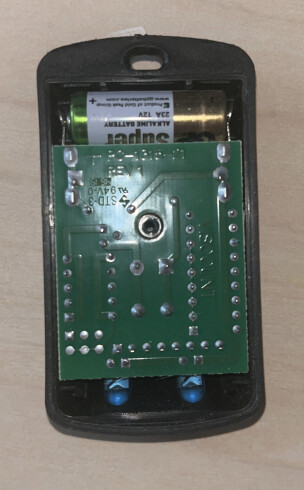
I unscrewed the fob and got something like this

Theres a number here that is 35009.
I also opened up the second fob and that number was 43654 so this number on the white sticker is probably unique to each fob
1 Like
@trance Were you ever able to successfully emulate the transmitter? I have the same one for my building and am looking to do the same.
I have not found a solution yet.
Not sure if @LupusE or @Sir_Fap_A_Lot could give another crack at it? 
We know a lot about this device. But I don’t want to scrap all information by myself.
I wish a clear state of both known remotes.
One dump with 4 times the same button.
One dump with one time every button.
So we’ll get 4 files
35009_Btn1-4_times.ir
35009_Btn1_to_4.ir
43654_Btn1-4_times.ir
43654_Btn1_to_4.ir
Maybe this will get us an insight about how the wiegand encoding is used here.
@LupusE let me see if I can provide some more information on the device. I am a novice at this, but have a strong technical background, so your insight is very useful.
First of all, there is only one button on the device. It is in the center of the unit. Below is a photo of the single button.
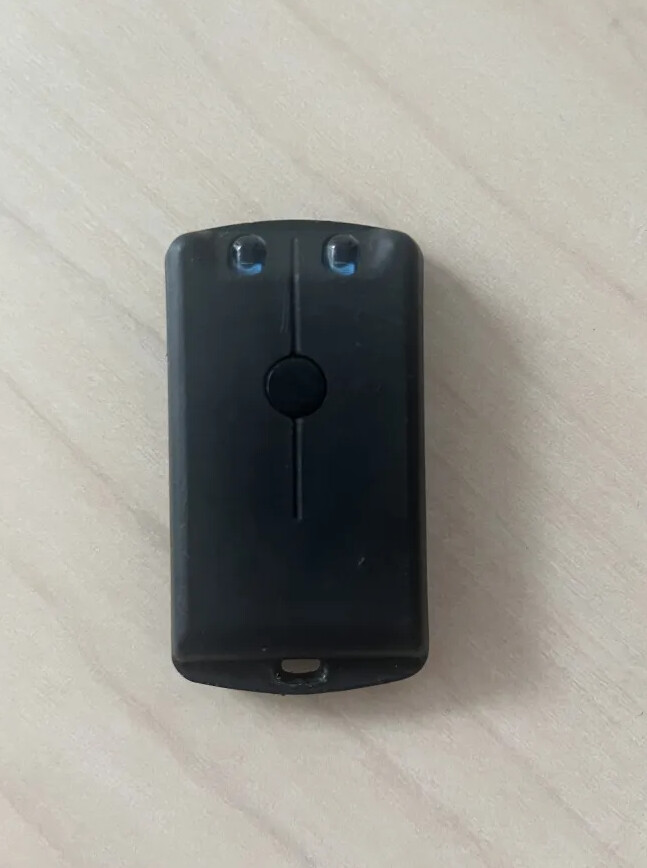
I’ve opened up the device as well. It’s identical to @trance fob on the outside but internals are from a different manufacturer. It looks like mine is from Viscount, and has the identifiers PC-1315-21, REV 1, STD-3, 94V-0. Below is a photo of the internal board displaying this information.
Here is a link to what I believe to be the fob pictured in my post.
From this page the notable information seems to be that it is a IR TX VISC Transmitter, and it has a bit format of 32/26.
When reading the remote output (pressing the button into the IR sensor of the flipper) It appears that I get a different number of samples. I should note that when pressing the IR fob into the remote most times It does not capture the signal immediately, and I have to press the button a few times for it to be read. I am doing this in a dark room so there shouldn’t be interference. When reading I commonly getting 3, 5, and 7, once getting 15. I’ve saved these inputs to a remote and have as follows:
Filetype: IR signals file
Version: 1
#
name: RAW_7_1
type: raw
frequency: 38000
duty_cycle: 0.330000
data: 90 7763 91 19564 90 7781 86
#
name: RAW_3_1
type: raw
frequency: 38000
duty_cycle: 0.330000
data: 85 7802 86
#
name: RAW_7_2
type: raw
frequency: 38000
duty_cycle: 0.330000
data: 88 7745 88 39197 92 7796 91
#
name: RAW_3_2
type: raw
frequency: 38000
duty_cycle: 0.330000
data: 91 3093 89
#
name: RAW_7_3
type: raw
frequency: 38000
duty_cycle: 0.330000
data: 86 7781 87 31334 90 3828 88
#
name: RAW_5_1
type: raw
frequency: 38000
duty_cycle: 0.330000
data: 91 3092 90 46988 86
#
name: RAW_15_1
type: raw
frequency: 38000
duty_cycle: 0.330000
data: 91 3094 87 7777 92 62689 86 16348 88 22799 87 8585 86 3884 85
I’m kind of stuck at this point, and am not sure what next steps I can take to decode the information. Any pointers to help me would be greatly appreciated.
The codes seems to be very short. Not much to decode.
Mostly we’ve got an header and two signals for a 0 or 1 … So in your example only the last one looks like ‘something’.
Let’s say 91 is the beginning ‘on’, very short, but we need a start. Than the signal is 3100 ms off, 90ms on, 7800ms off, 92ms on, 62000ms off.
To decode, there is a small burst around 90ms and different timings of off behind.
~~Assumption: One IR LED is the trimmer, the other sends an different signal.
Could you cover the left LED and press the button for 2 to 4 seconds. Two times. Repeat this with the right LED covered.
Now we want to see if the 2 datasets are similar or not.~~ (correction, because the PCB already shows the IR LEDs are connected in series and therefore cand send 2 different signals. Obvious the markdown for ‘line trough’ does not work in this forum).
Could you press the button for 2to 4 seconds, because all buttons except the last one are not useable for reversing.
Thanks for the response @LupusE. I didn’t even realize the the string of integers represent on/off timings. Given the medium is IR, this make a ton of sense. I guess at this point we’re just trying to determine the correcting timing.
I’m not home currently, but when I am later today ill record the 2-4 second button holds and update with the data recorded.
The IR fob is a long range ir fob that outputs Wiegand 26bit FC adnCN. The flipper can capture and playback the signal only if you place the flipper directly on the ir receiver. The ir remote uses two IR, one is for wide and the other is for narrow. They both output the same thing… You can even remove one and it will still work, it won’t break the circuit… You will need to remove the plastic protector on the flipper that covers ir, and use the correct protocol. You will not achieve the distance and range with flipper unless you modify the leds and circuit to add 12v power.
A more simple approach would be an IR add on board. I’ve seen some pretty powerful ones.